+1 877 33 SCALE

You paid for a website. Maybe you pay for SEO or ads as well. People visit, yet the phone stays quiet and the contact form sits empty.
Here is the short answer. A website not generating leads usually has one of three problems. The wrong people are visiting. The right people visit but don't see a clear reason or an easy way to contact you. Or inquiries do come in and then get lost.
Traffic and leads are two different things. Traffic is people arriving. A lead is a person who calls, books, or fills out a form. That's why "get more traffic" is rarely the fix. The first job is to find where leads drop out of your funnel, which simply means the point where interested people stop moving toward you.
Each of the nine causes below comes with a way to check it yourself.
1. Your Website Is Attracting the Wrong Traffic
A busy website can still be full of people who will never buy from you.
Search intent is the reason behind a search. Someone typing "how to get rid of ants in the kitchen" wants a tip. Someone typing "pest control company in Austin" wants to hire. If most of your visitors come from the first kind of search, your traffic report looks healthy while your lead count stays flat.
How to check: Open Google Search Console and go to the Performance report. Click the Queries tab and read the searches that bring people in. Mark each one "wants information" or "wants to hire." In Google Analytics 4 (GA4), the Traffic acquisition report shows which channels send visitors and how engaged those visitors are.
First fix: Build or improve pages for the searches buyers use: your service, your city, your pricing. Then make sure you're paying for the right channel. This guide explains which marketing services you actually need.
2. Your Website Does Not Make Its Value Clear
A new visitor should understand from the first screen what you do, who you do it for, and why you're a good choice. Many homepages open with a line like "Solutions built around you," which could describe any company.
Unclear messaging makes people work, and people who have to work tend to leave. A list of services isn't enough either. "Bookkeeping, payroll, tax preparation" is a list. "Monthly bookkeeping for Denver restaurants, with your books closed by the 5th" is a reason to call.
How to check: Show your homepage to someone outside your business for a few seconds, then close the laptop. Ask what you sell and who it's for. If they hesitate, the headline needs work.
First fix: Rewrite your main headline as what you do, who it's for, and the result. Under it, state one benefit a customer cares about, in plain words.
3. Your Website Has Weak or Confusing Calls to Action
A call to action (CTA) is the next step you ask a visitor to take. When that step is missing, hidden, or vague, interested people leave without contacting you, and your website is not converting the visitors it already has.
Common problems include:
- Button text like "Submit" or "Learn more" that says nothing about what happens next.
- Five different buttons competing on one page.
- A phone number that only appears in the footer.
- A twelve-field form for a simple quote.
The right action depends on the business. An auto repair shop needs a tap-to-call button and online booking. A law firm needs "Request a free consultation." An online store needs a visible "Add to cart" and clear shipping costs.
How to check: Open your top three pages on your phone. Can you find one obvious next step without hunting for it?
First fix: Pick one main action per page. Name the button after what the visitor gets, such as "Get my quote." Repeat it after each major section, and remove every form field you don't truly need.
4. Your Website Loads Slowly or Is Hard to Use on a Phone
A slow or awkward page gives people a reason to leave before they read a word.
Google publishes targets called Core Web Vitals. A page offers a good experience when its main content loads within 2.5 seconds, it responds to a tap within 200 milliseconds, and the layout barely moves while loading.
Also watch for menus that are hard to tap, pop-ups that cover the whole screen, text that needs zooming, and forms that are painful to fill in with a thumb.
How to check: Run your main pages through PageSpeed Insights. Where it has enough data, it reports what real visitors experienced over the past 28 days and labels each metric Good, Needs Improvement, or Poor. Then fill out your own contact form on a phone.
First fix: Compress large images, remove plugins and scripts you no longer use, and simplify the mobile form.
5. Why Is My Website Not Ranking? You're Not Showing Up Where Customers Search
If people can't find you, no page design will produce leads. If you keep asking "why is my website not getting traffic?", start here.
Low visibility usually comes from one of four things:
- Google hasn't indexed your pages, meaning it hasn't stored them in its results.
- Your pages use words your customers don't search for.
- Your content doesn't answer the search better than the pages already ranking.
- Technical problems stop Google from reading the site.
Publishing blog posts alone doesn't solve this. Google's own advice is to use the words people search with in your titles and main headings.
Search is also changing. Google's AI Overviews and tools like ChatGPT now answer many questions directly. Earning a place in those answers is often called answer engine optimization. Google says the same basics apply: original, helpful content on a technically sound site, with no special files required. For local businesses, it also points to an accurate Google Business Profile.
How to check: In Search Console, look at impressions and average position for your service pages. Low impressions mean you're rarely shown. Use the URL Inspection tool to confirm a page is indexed.
First fix: Give each service its own page, written around the search a buyer would type.
6. Your Website Does Not Build Enough Trust
Contacting a business you've never heard of feels like a risk. Visitors look for signs that you're real, capable, and safe to call.
Proof that helps:
- Reviews from named customers.
- Photos of your actual team and work.
- Licenses, certifications, and insurance details.
- A street address and a phone number.
- Case studies with specific numbers. We publish real client results for this reason.
Don't invent or inflate testimonials. Vague praise from "John D." reads as fake, and one made-up review can undo the credibility of every real one.
How to check: Look at the page where you ask for contact. Is any proof visible near the button?
First fix: Move your best review, one result, and your credentials next to the call to action.
7. Your Marketing Channels Are Not Working Together
Customers rarely see just one thing. They might notice a Facebook post, search your name a week later, click an ad, and then read your homepage. If each piece says something different, it feels like dealing with four different companies.
This happens when SEO, ads, social media, and the website are run by different people with different goals. The ad promises "same-week installation." The landing page talks about "quality craftsmanship." Nobody counts leads across the whole path, so good work in one channel gets wasted by another.
How to check: Put your latest ad, social post, email, and homepage side by side. Do they make the same promise to the same customer?
First fix: Agree on one core message and one shared lead number that everyone reports on. That is the idea behind 360-degree digital marketing.
8. Your Ads Are Sending Visitors to the Wrong Pages
When you pay for a click and send that visitor to your homepage, you often waste the click.
Picture a med spa running a Google ad for "laser hair removal pricing." The click lands on a homepage about facials, injectables, and the owner's story. The visitor has to hunt for what the ad promised, and many won't bother.
The keyword, the ad, and the landing page should all say the same thing, and the page should offer one action that matches the ad. Google Ads rates this. Each keyword gets a landing page experience status of Above average, Average, or Below average.
The destination doesn't have to be a web page at all. For a local cooling company, we ran Meta ads that let people call or message directly, cutting cost per call by 60%.
How to check: Click your own ads. Does the page repeat the ad's offer in its headline? In Google Ads, add the "Landing page exp." column to your keywords view.
First fix: Build one focused page per offer and track conversions on it.
9. You Are Not Tracking or Following Up on Leads Properly
Sometimes the website is producing leads and nobody knows, or nobody answers.
Forms can break after a site update. Notification emails can go to a former employee's inbox. Without conversion tracking, you can't tell "no leads" from "leads we never counted."
In GA4, important actions are tracked as key events. Google recommends an event named generate_lead for form submissions, and you can import key events into Google Ads as conversions. Add call tracking if most of your customers phone you.
Then look at follow-up. A lead who waits a day for a reply may already have called someone else. A simple CRM (customer relationship management tool), or even a shared spreadsheet, should show every inquiry, who owns it, and what happened next.
How to check: Submit your own form and call your own number today. Time how long a real reply takes.
First fix: Set up key events, send every inquiry to one place, and agree on a reply-time goal.
How to Find Out Why Your Website Is Not Generating Leads
Before you spend more on marketing, spend an hour with five sources of data.
- Forms and phone. Test them yourself. Count real inquiries from the last 90 days.
- Google Analytics 4. Use the Landing page report to see where visitors enter, Traffic acquisition to see where they come from, and key events to see what they do.
- Google Search Console. Check clicks, impressions, average position, and queries for your main pages. Confirm those pages are indexed.
- PageSpeed Insights. Test your top landing pages on mobile.
- Your CRM or inbox. Review lead quality, response time, and how many leads became customers.
Then look for patterns. Treat them as signals to investigate, not final answers.
| What you see | What it may point to | Causes to review |
| Low impressions and low clicks | A search visibility problem | 5 |
| High traffic, low engagement | Wrong visitors or a poor page experience | 1, 4, 8 |
| High engagement but no leads (traffic but no conversions) | Weak calls to action, missing trust, or an unclear offer | 2, 3, 6 |
| Many form visits, few submissions | Form friction or unclear value | 2, 3 |
| Leads arrive, few become customers | Slow follow-up or poor lead quality | 7, 9 |
Fix the biggest gap first. For a faster start, our free Marketing Report Card scores your website across six areas in about 30 seconds.
How to Get More Leads From Your Website
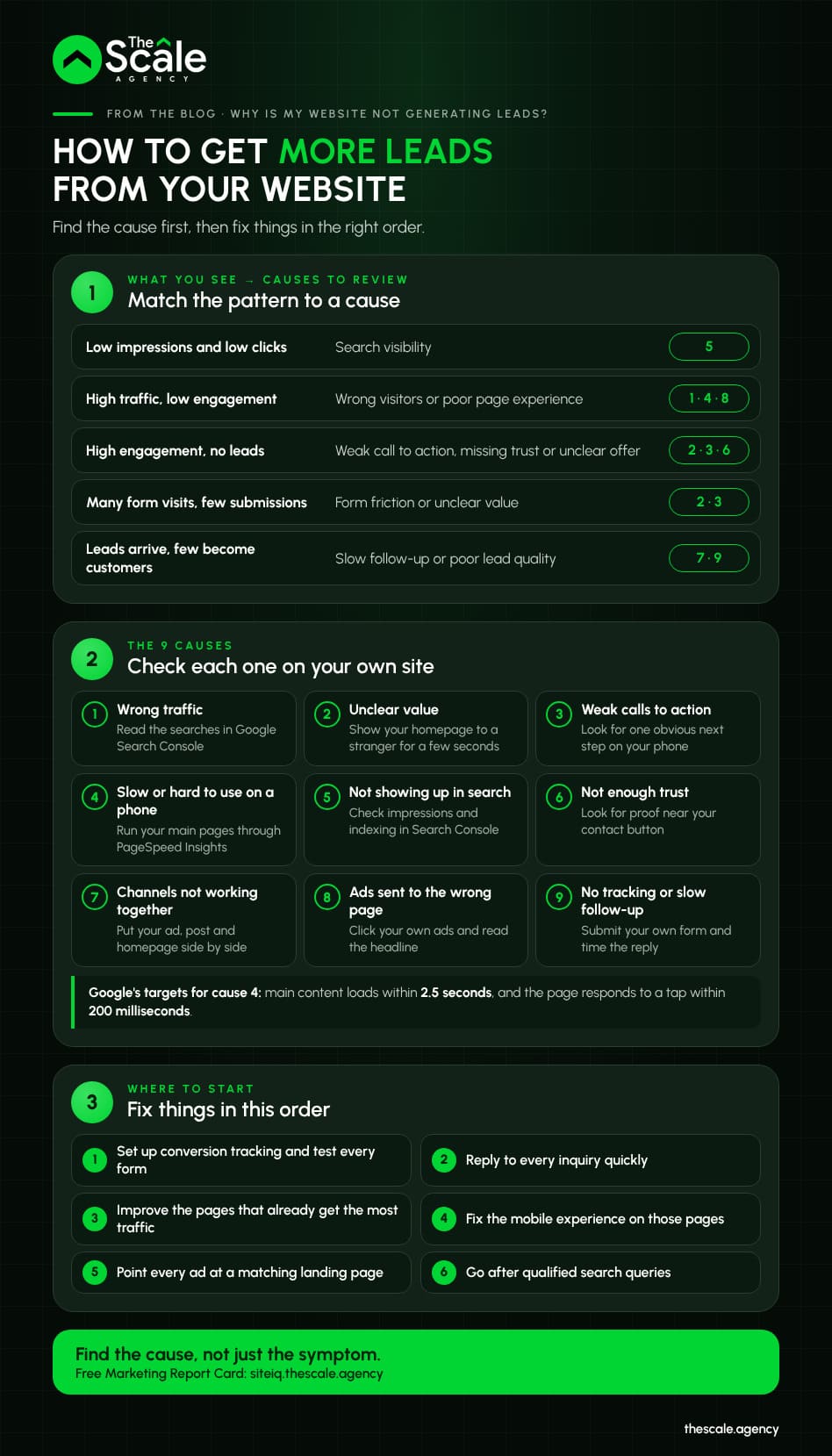
Work in this order.
- Set up conversion tracking and test every form and phone number.
- Tighten follow-up so every inquiry gets a quick reply from a real person.
- Improve the pages that already get the most traffic. Rewrite unclear headlines, add one relevant call to action, and place real proof beside it.
- Fix the mobile experience on those same pages.
- Point every ad at a matching landing page.
- Go after qualified search queries with a dedicated page for each service.
Change one thing at a time and compare results over several weeks. No one can promise a set number of leads, but this order keeps you from paying for visitors before the site is ready.
Fixing a Website Not Generating Leads Starts With the Cause
A website not getting leads is rarely fixed by more traffic alone. The answer sits somewhere along the path from search visibility and visitor intent to page experience, trust, conversion, and follow-up. Find the weakest step, fix it, and measure again.
If you'd like a second set of eyes, start with the free Marketing Report Card. And if the problem spans several channels, our full-service digital marketing team can help you connect them.