
 +1 877 33 SCALE

On October 21, 2026, the PHP project released emergency updates for two critical flaws now known as PHP2Shell. The bugs sit inside PHP itself, the programming language behind WordPress, Drupal, Joomla and many custom business websites. On an unpatched server, an attacker can run their own code without logging in. Two days later, PHP disclosed a third, narrower issue that most sites will never trigger but that deserves a quick check.
What makes this story unusual is how the flaws were found. Security researchers used AI models to uncover bugs that had sat in PHP's code for more than a decade, and the same tools can help attackers move faster. If your business website runs on PHP, here is what happened, how to tell whether you are affected, and what to do this week. Then comes the bigger question: is a patch enough, or is it time to upgrade or rebuild an aging site? One thing up front: patching fixes PHP2Shell. Rebuilding does not.
What Is PHP2Shell?
PHP2Shell is the nickname for two critical vulnerabilities in the core PHP engine, tracked as CVE-2026-109618 and CVE-2026-109619. Both scored 9.2 out of 10 on the CVSS v4.0 severity scale, and both can allow remote code execution, meaning an outsider can make your web server run commands of their choosing. A CVE is simply a public ID number for a known flaw.
Both bugs involve how PHP cleans up after a request fails, for example when it runs out of memory: leftover data from the failed request can be treated as valid by a later one. The PHP security advisory describes them as remote code execution through out-of-memory corruption and through stale global state. Researchers at Wiz, who found the bugs, took control of fresh WordPress, Drupal and Joomla installations without a password and showed that one flaw could leak passwords and API keys from server memory. Because the problem lives in PHP itself, a well-coded site can still be exposed if the PHP version beneath it is old (Wiz Research, Oct. 21).
That does not make every PHP site equally exposed. PHP rated the risk highest for Apache servers running mod_php, where a demonstrated exploit works before any application code runs. Other setups such as PHP-FPM are in scope but harder to attack. Exposure depends on your PHP version, your server configuration and whether anyone is probing your site. If your site runs on WordPress, WooCommerce, Drupal, Joomla, Magento, Laravel or a custom build from a few years ago, PHP is probably doing the work, and your host or developer chooses the version.
A third issue: CVE-2026-115560
On October 23, PHP disclosed a separate code-execution flaw, CVE-2026-115560. It is not part of PHP2Shell and is not fixed by the October 21 updates. It applies only to applications that change the session.serialize_handler setting at runtime, before starting a session, after setting it to a non-default value in configuration. The PHP Foundation calls that setup unlikely in practice, has reported no exploitation, and says a full advisory and fix will come with the next routine release. Until then, PHP's advice is to set session.upload_progress.enabled=0 and restart PHP (The Hacker News, Oct. 23; CERT-EU advisory 2026-018 v1.2). Most WordPress and framework sites won't use the pattern, but ask your developer.
How AI Found Critical PHP Vulnerabilities
Wiz Research found the first PHP2Shell bug on August 19, 2026, using its own AI security agent with Google's Gemini 4 Argon and OpenAI's GPT-5.6 Sol. Within two days it had working attacks against Drupal and WordPress, and it reported the problem to PHP on August 24. A separate AI firm, Calif, found related issues around the same time using GPT-5.6 Sol and alerted OpenAI, which found more (Fortune, Oct. 21).
The bugs were not new; Wiz says the code had been in PHP for more than ten years. What changed is the effort needed to turn it into a working attack. Wiz says that used to take a world-class team months; with AI, one researcher finished in about a week. AI did not replace the researchers, who chose the target, verified results and worked with PHP on the fix, but it compressed the timeline, and it can do the same for attackers.
Is Your Website Affected?
Your site may be affected if it runs any PHP version older than the patched releases below. Wiz reports that every version back to PHP 5.4 carries at least one of the bugs, regardless of CMS or framework. Managed hosts typically patch PHP for you, and many posted their status on October 21. If you have cPanel or a hosting dashboard, look for a "PHP Version" or "MultiPHP Manager" setting. Otherwise, email your host or developer: "Which PHP version is my site running, and is it patched for CVE-2026-109618 and CVE-2026-109619?"
Which PHP versions are safe?
| PHP branch | Vulnerable | First patched version | Support status |
| 8.5 | 8.5.0 – 8.5.11 | 8.5.12 | Active support |
| 8.4 | 8.4.0 – 8.4.26 | 8.4.27 | Active support |
| 8.3 | 8.3.0 – 8.3.35 | 8.3.36 | Security fixes only |
| 8.2 | 8.2.0 – 8.2.34 | 8.2.35 | Security fixes end Dec. 31, 2026 |
| 8.1, 8.0, 7.4 | All versions | Minimal source patches only | End of life |
| 7.3 and older | All versions | No fix | End of life; upgrade or isolate |
Sources: PHP security advisory, Canadian Centre for Cyber Security alert AL26-026. Note that Linux distributions often apply security fixes without changing the version number, so developers who run their own servers should confirm the fix in the package changelog.
What Should Website Owners Do Right Now?
Patch first, verify second, then look at anything else.
1. Find out who owns PHP updates for your site. Managed host, agency, freelancer or in-house. If you don't know, email your host.
2. Confirm your PHP version and patch status. It should be at or above 8.2.35, 8.3.36, 8.4.27 or 8.5.12, or have a vendor backport applied.
3. Move to a supported branch, not just the minimum. PHP 8.2 stops receiving security fixes on December 31, 2026. Going to 8.3 or newer now avoids a second upgrade before year end.
4. If you are on PHP 8.1 or older, act with more urgency. There is no official patched release. Ask whether your host applied PHP's source patch. If not, upgrade the branch or take the site offline until fixed, which is what the U.S. Cybersecurity and Infrastructure Security Agency (CISA) advised for systems that cannot be patched.
5. Apply the session setting, but don't stop there. session.upload_progress.enabled=0 is PHP's mitigation for CVE-2026-115560 and reduces exposure to one PHP2Shell flaw. It is not a substitute for the October 21 update.
6. After patching, look for signs of trouble. New admin users you didn't create, unfamiliar files, or a spike in HTTP 500 errors before the patch deserve a closer look. A patch closes the door; it does not evict anyone already inside.
Call a developer if your site runs on an unsupported branch, your host says the upgrade will break the site, or nobody is responsible for updates at all.
Is PHP2Shell Being Exploited?
Attempts are happening at scale, but no confirmed compromise of a named organization has been made public as of October 26, 2026. Security firms including watchTowr, Cloudflare and Hadrian reported attack traffic from October 21, and attempts have reached the millions with no confirmed compromises reported so far (watchTowr FAQ; Cybernews, Oct. 24). CISA said on October 21 that it had not observed exploitation, and as of October 25 neither CVE was in its Known Exploited Vulnerabilities catalog (Tenable FAQ). That may change.
Attempts only succeed against unpatched servers with a reachable configuration. If your site was updated on October 21 or 22, the risk from PHP2Shell is low. A patched site still carries the ordinary risks every website has, such as weak passwords, outdated plugins and the next flaw nobody has found yet.
Not sure who keeps your website patched?
Many owners learned this week that nobody owned their PHP updates. The Scale Tech's website maintenance packages include proactive security patching, malware monitoring, backups and hosting management, with a named team watching for the next advisory. Ask for a free proposal sized to your site.
Get a Free Maintenance Proposal →
What PHP2Shell Teaches Us About Older Websites
The lasting lesson is not about PHP. Software you stopped updating is now easier to attack than it used to be. Every PHP version moves through active support, security fixes only, then end of life, after which new flaws are not fixed no matter how serious. PHP 7.4 reached end of life in 2022, yet many business sites still run it because "it works." PHP2Shell showed what that bet costs: 7.4 owners got a source patch as a courtesy, and 7.3 owners got nothing. The same applies to old plugins, abandoned themes and custom code whose developer left years ago: each year the site gets harder and more expensive to update safely, so updates get skipped.
The practical takeaway: a website needs a maintenance budget and a named person responsible for updates, the same way a storefront needs someone who locks the door. Businesses that had that spent October 21 confirming a patch; the rest spent it finding out who to call.
Should You Patch, Upgrade or Rebuild Your Website?
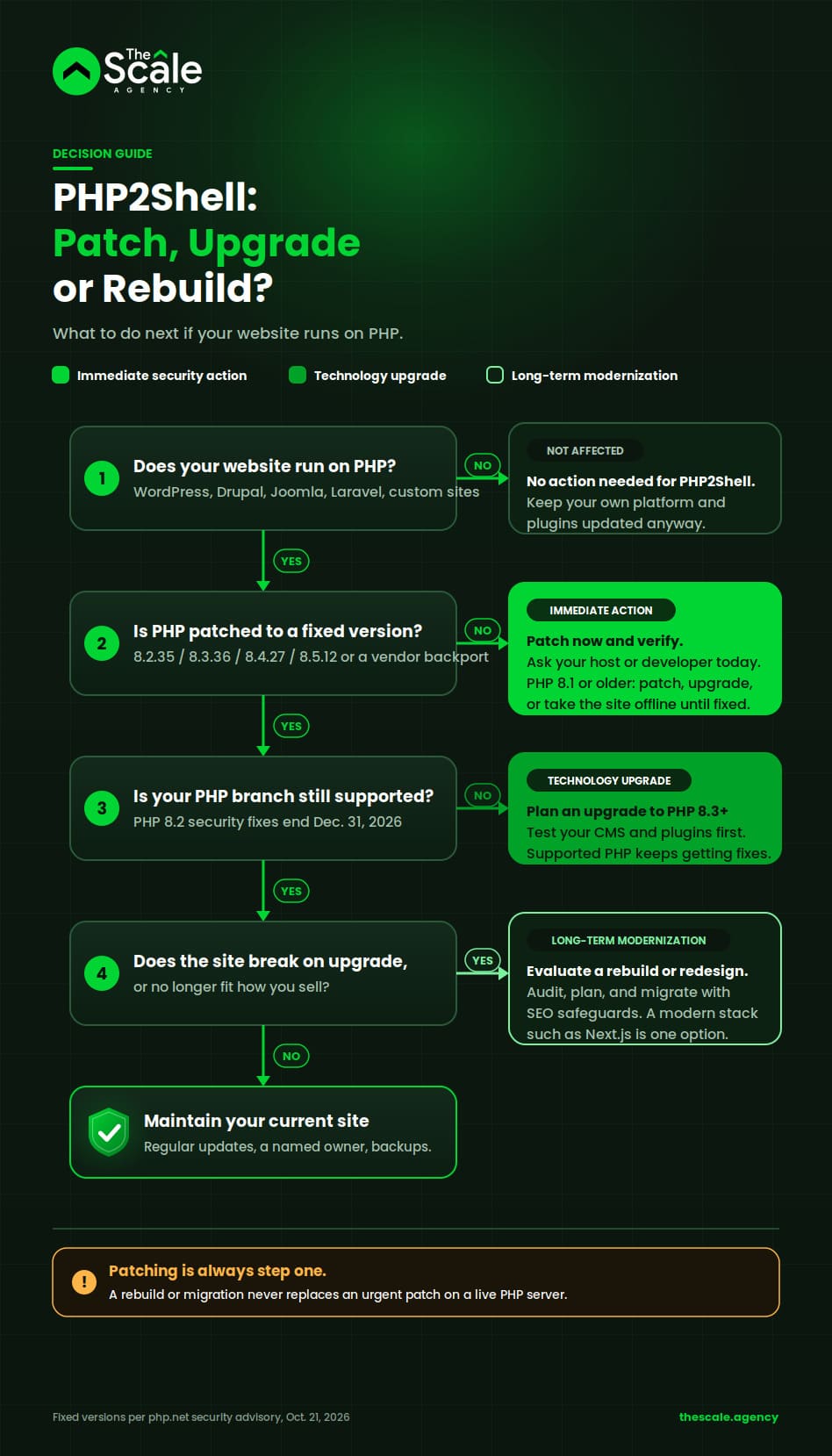
For most sites, patching is the whole answer. The other options are for sites where patching has become hard, or where the site already holds the business back.
| Your situation | What to do | Why |
| PHP 8.2–8.5 and your host updated it | Patch only (done). Move to 8.3+ before December. | The flaw is fixed. |
| PHP 8.2–8.5 but updates keep slipping | Patch now, then fix the process with a maintenance plan or owner. | The risk was the gap, not the technology. |
| PHP 8.1 or older, healthy application (current WordPress, Laravel) | Upgrade the PHP branch to 8.3 or newer. | Supported PHP gets future fixes; modern CMSs support 8.3+. |
| Old PHP, application breaks when upgraded | Patch or isolate now; evaluate a rebuild. | Each future fix costs more. A rebuild lets you choose the stack. |
| Slow, hard to change, no longer fits how you sell | Patch now; plan a modernization project. | Security is the trigger; performance, SEO and sales are the case. |
If you land in the last two rows, the next question is what to rebuild with. Next.js is one common option, and it deserves a fair comparison.
PHP vs Next.js: What Business Owners Should Know
PHP and Next.js are different kinds of tools, and neither is "the secure one" or "the fast one." PHP is a server-side language that frameworks and CMSs are built on. Next.js is a framework built on React and JavaScript that can render pages on the server, at build time or in the browser. A well-built, well-hosted, well-maintained site on either can be fast, secure and easy to rank; a neglected site on either can be none of those things. Security shows why: Next.js had its own critical flaw, React2Shell (CVE-2025-55182), in December 2025, when a bug in React Server Components allowed remote code execution on default Next.js apps until patched (Zscaler advisory). What protects you is how fast someone applies the fix.
| Factor | PHP (WordPress, Laravel, custom) | Next.js (React) | What it really depends on |
| Security | Mature; risk comes from old versions and unmaintained plugins. | Modern, fast-moving; dependencies need frequent updates. | Patch speed and plugin or dependency hygiene. |
| Performance and Core Web Vitals | Fast with good caching and hosting; older custom sites often slow. | Built-in tools for static pages and image optimization; a slow app is still easy to build. | Caching, hosting, images, third-party scripts. |
| SEO | Fine; most SEO tooling assumes WordPress. | Fine when server-rendered; client-only rendering can hide content from crawlers. | Crawlable HTML, clean URLs, speed. |
| Scalability | Scales with hosting; spikes may need caching. | Static pages handle spikes cheaply; dynamic features still need backend capacity. | Architecture and hosting plan. |
| Maintenance | PHP developers easy to find; CMS updates routine. | Needs JavaScript developers; frequent releases. | Who maintains it, how often. |
| Hosting | Inexpensive shared hosting up to enterprise. | Vercel, Netlify, AWS or a Node server; shared PHP hosting won't run it. | Budget and in-house skills. |
| Cost | Lower upfront, especially with WordPress. | Higher upfront; may lower ongoing cost if the old site was a burden. | Scope and integrations. |
| Migration effort | None if you stay. | Significant: content, URLs, forms, integrations and SEO all move. | Site size and custom logic. |
Stay on PHP if your site runs WordPress or a maintained Laravel app, your team relies on the CMS editor, and your host keeps PHP current. Evaluate Next.js if your site is a custom build on an unsupported version, speed drags on rankings or conversions despite optimization, you need app-like features, or the people who built it are gone. The security scare is the prompt; the business case should drive the decision.
Wondering if your website has outgrown its platform?
Sometimes a patch is enough. Sometimes an aging custom site costs more to keep than to rebuild. The Scale Tech's developers work in PHP, Laravel, WordPress, React and Node.js, so they can compare an upgrade against a rebuild on your numbers, not a preferred stack. Start with a custom web development conversation.
Explore Custom Website Development →
How to Migrate an Older PHP Website Without Losing SEO
A migration changes the technology under your site while trying to keep your visitors, rankings and leads. Because the website is where search, ads, social and email traffic all land, as our 360-degree digital marketing guide explains, a migration touches far more than the server. It is one of the riskiest things you can do to search visibility, and no one can promise rankings will hold or recover on a schedule. A professional process makes the risks visible and manageable:
1. Website and technology audit. What the site runs on, depends on, and earns from.
2. Content and URL inventory. Crawl every page, image, PDF and form with its traffic and rankings, so nothing is lost by accident.
3. Migration planning. What moves, merges or retires, with a content freeze near launch.
4. Choosing the architecture. A marketing site may suit Next.js with a headless CMS; a store may stay on WooCommerce. Pick a stack your team can edit and afford.
5. Preserving important URLs where possible. The strongest protection you have.
6. Accurate 301 redirects. Every changed URL points to its specific new home, never a blanket redirect to the homepage.
7. Canonical tags. Each page declares its preferred URL so duplicates created during the switch don't compete.
8. Metadata and structured data. Titles, descriptions, Open Graph tags and schema move with the content.
9. Core Web Vitals and performance testing. Test on real mobile connections before launch.
10. Google Search Console and sitemap monitoring. Submit the new sitemap, then watch crawl errors, indexing and rankings for weeks and fix what slips.
Even with all ten, expect movement while Google re-crawls, and rankings can fall when URLs, content or internal links change substantially. The safeguard is a team still watching and fixing weeks after launch.
How The Scale Tech Can Help Modernize Your Website
The Scale Tech is the web development arm of The Scale Agency. The team has spent more than 15 years building custom websites and web applications, with 500+ custom projects delivered, and works across PHP, Laravel, WordPress, React, Node.js and other frameworks. The first job is to say honestly whether your site needs a patch, an upgrade or a rebuild. Three services map to those decisions:
• Keep your PHP site, stop worrying about updates. Website maintenance packages cover security patching, malware monitoring, backups, performance reviews and hosting management on a monthly or annual plan.
• Keep the platform, fix the experience. The website redesign service brings a dated site up to current performance and design standards without starting from zero.
• Start fresh on a modern stack. Custom web development covers new builds, including React-based stacks such as Next.js, with the URL inventory, redirects and post-launch monitoring built into the plan.
Final Thoughts
If your website runs on PHP, confirm it was patched to 8.2.35, 8.3.36, 8.4.27 or 8.5.12, apply the session setting as a precaution, and plan to be on 8.3 or newer before year end. Then look at how you run the site. AI has made old, unmaintained software a softer target, and the next flaw will not wait a decade to be found. Every business site needs a named owner for updates, a maintenance budget and an honest look at whether its technology still serves the business. For many, that means better upkeep of a good PHP site. For some, it means planning the rebuild they have been putting off, with the SEO work done properly.
Plan your next website with a clear roadmap
Whether you stay on PHP or move to a framework like Next.js, the work starts with discovery and planning, not a sales call. The Scale Tech has delivered 500+ custom projects over 15+ years. Tell the team what your site needs to do and get a free proposal with options, timeline and cost before you commit to anything.


